



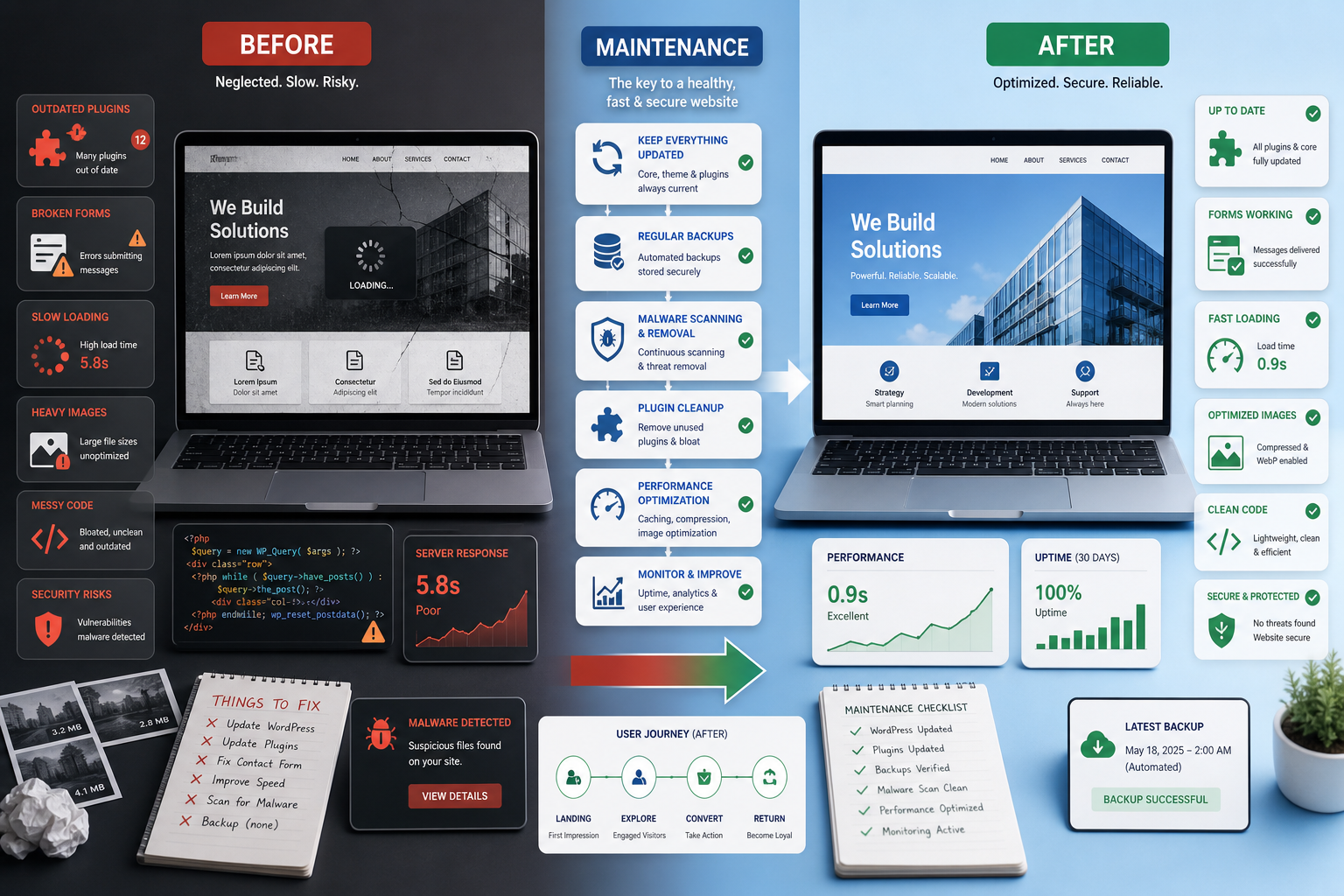
Before and After: How Maintenance Improves WordPress Security and Speed
WordPress maintenance improves security and speed by turning a fragile, reactive website into a monitored, updated and better-optimized business asset. The biggest gains usually come from a combination of plugin control, safer updates, backup discipline, malware prevention, performance tuning and regular review of critical pages.
Before maintenance, many websites look fine from the outside while hiding risk: outdated plugins, slow templates, weak backups, unused scripts, heavy images and untested forms. After structured maintenance, the site becomes easier to trust, easier to update and less likely to fail at the wrong time.
Before maintenance: what usually goes wrong
Most WordPress problems build up gradually. A plugin is ignored, a theme update is postponed, a backup is never tested, a marketing script slows down the homepage, or a contact form silently stops sending messages.
| Before | Risk |
|---|---|
| Plugins updated without testing | Conflicts, broken layouts and failed forms |
| No clear backup process | Slow or incomplete recovery |
| Unused plugins remain active | Security and performance overhead |
| No speed monitoring | Slow pages affect UX and conversion |
| No checkout or form validation | Lost leads or revenue |
After maintenance: what changes
A maintained WordPress site is not perfect, but it is controlled. Updates follow a process. Backups have a purpose. Security is reviewed. Performance is watched on the pages that matter. Critical user journeys are tested before issues become visible to customers.
- Updates are reviewed and tested where risk is higher.
- Backups are monitored and aligned with the business impact of the site.
- Unused plugins, themes and scripts are removed or reduced.
- Security checks identify suspicious changes earlier.
- Performance is reviewed on important templates, not only the homepage.
- Forms, checkout and conversion paths are validated regularly.
Security improvements from maintenance
Security improves when the site is kept current, unnecessary exposure is reduced and suspicious behavior is monitored. This includes plugin updates, admin account review, login protection, malware scanning and removing abandoned components.
The goal is not to promise that nothing can ever go wrong. The goal is to reduce avoidable risk and make response faster if an issue appears.
Speed improvements from maintenance
Speed improves when maintenance includes performance review, not only updates. WordPress sites often slow down because of oversized images, plugin bloat, render-blocking assets, poor caching or heavy page-builder sections.
Regular maintenance can identify the causes and prioritize the fixes that matter most for users: server response, LCP images, scripts, cache, database overhead and mobile templates.
How to measure the before-and-after impact
- Compare uptime and downtime events.
- Review plugin and theme update status.
- Test backup restore confidence.
- Measure page speed before and after changes.
- Check Core Web Vitals signals on key templates.
- Validate form submissions and checkout behavior.
- Review malware scans and security alerts.
Need a maintenance review?
If your WordPress site has become slower, riskier or harder to update, a maintenance review can show what needs to change first.
Request a WordPress maintenance review to identify the security and speed improvements with the highest business impact.
FAQ
Can maintenance really improve WordPress speed?
Yes, when maintenance includes performance checks, image review, plugin cleanup, caching improvements and template optimization.
Does maintenance prevent all security problems?
No process can remove all risk, but regular maintenance reduces avoidable exposure and improves detection and recovery.
What should be checked after maintenance?
Check updates, backups, uptime, security scans, page speed, forms, checkout, internal links and key templates.
Conclusion
The biggest benefit of WordPress maintenance is not simply that plugins are updated. It is that the website becomes safer, faster and easier to trust. A before-and-after review helps show which changes reduce the most risk and improve the most important user journeys.